Government of Canada
The 2026
Digital Lifecycle Guide
This is a guide for people who work on digital services for the Government of Canada. You could be anyone. You may hold any role in your organization, or come from any background. You might be in a small team or a big one. You might build in-house, contract a team to build, or buy from suppliers. You might have a lot of money or very little.
That is fine. This guide is not about who you are. It is about the practices that matter for any digital work, at any size.
We will not tell you exactly what to do. We do not know enough about your situation to do that for you. We will suggest what to think about, what to watch for, and what to do regardless of the rest. The shape of your work will be different from someone else's. The questions are the same.
Who this is for
This guide is for you, whatever brought you here
Some people reading this know exactly what they own. Their department's application register has their name against a system, and once a year somebody asks them to rate its health.
Most do not. They think of themselves as running a program. A grant, a licence, a benefit, an inspection regime. Each of those has a digital solution, and someone is accountable for that solution.
You might be:
- a business owner already named against a system in your department's application register
- a program manager whose process has stopped coping with the volume
- a policy lead who has been told to deliver something by a date
- a director general who has inherited a system nobody can fully explain
- a project manager handed a service that is already live
- someone who has just been told there is money to buy a system
You may never have chosen any of this. It does not matter how you arrived.
If a digital service delivers your program, or one is about to, you are its business owner. You are accountable for it from before it exists until after it is switched off. This guide is for you.
See the whole path
The official checkpoints of a digital service
Here is the entire lifecycle on one page: every official approval, review, and sign-off a service passes through, from the first problem to retiring or replacing it, who owns each one, and roughly how long it takes.
The three phases
Every digital service, whatever it does, runs into the same handful of questions over its life. What problem are we solving, and for whom. Is the solution working for the people who use it. Is it still the right solution. When is it time to let it go. The questions repeat. What changes is where you are in the life of the service when you ask them.
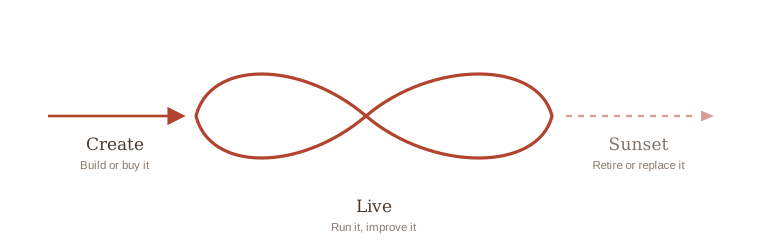
The lifecycle falls into three phases: Create, Live, and Sunset. A phase is a big chapter in the life of a service.
Each phase has smaller parts, called sub-phases. Create has Discovery, Alpha, and Beta. Live has Stabilization, Growth, and Maturity. The phase is like the chapter of a book; the sub-phase is the page you are on within it.
Whichever phase you are in, one idea runs under all of it: a government service is almost never the thing a person actually wants. It is one step in a much bigger journey of theirs, often spread across many departments and levels of government. Joined-up delivery is where that thinking starts.
Why it matters
Set the guide to your situation
This guide has two settings that change what you see throughout. Pick what fits your situation. You can change your mind later.
Buy vs build
The practices stay the same. What changes is who does the work — your team, a supplier, or both.
Size
The practices apply at any size. What changes is how heavy each one is.
For your setup
Pick either setting above and this note will change to match.
Working material, to be removed
Every official thing a service has to do, by sub-phase
Getting a service live means passing official checkpoints: assessments to run, boards to attend, registers to appear in, and duties that carry on for as long as the service does. Which ones apply depends on what the service does and how much is being spent, so no two services take the same path.
Read a row across: what it is, whether it applies to you, what you have to do about it, and what happens to it in each sub-phase of the service's life. Click a row for the full definition.
One caution. Which sub-phase an instrument sits in is this guide's own judgement, because no Government of Canada source uses these phase names. Where a placement follows a real deadline in the instrument, the row says so. Where it does not, the row says that too.
What the tags mean
- CheckFind out whether it applies to this service at all.
- GatherHand over the business judgement only the service team holds. Someone else writes it up.
- FillThe thing is actually produced.
- Sign or acceptA named person puts their name to it, or receives someone else's result and decides what to do about it.
- SubmitSent, filed, registered or published where the rule says.
- Keep currentThe service changed, or the clock came round. Re-run it, re-test it, or refresh the record.
- Close outFormally ended, disposed of, or marked retired.
What kind of thing each one is
- AssessmentWork that ends in a judgement: how bad, how likely, how critical.
- AuthorizationPermission to proceed, signed by a named person who accepts the risk.
- ReviewA board or committee looks at the work and decides.
- SubmissionA document sent up for a decision, usually about money or authority.
- RegisterA record the service is entered in and kept current.
- PlanArrangements written down in advance and tested.
- Standing dutyA standard the service has to meet for as long as it runs.
- FilingSomething sent or published, on a cycle or when an event triggers it.
This table is wide. Turn the phone sideways to read it, or open it full screen. Scroll sideways inside the table to reach the later columns.
| Instrument | Every service? | What brings it into scope | What the business owner does | Who does the work | Where it ends up | Create | Live | Sunset | ||||
|---|---|---|---|---|---|---|---|---|---|---|---|---|
| Discovery | Alpha | Beta | Stabilization | Growth | Maturity | Sunset | ||||||
| Security | ||||||||||||
| Security categorization Assessment source | Every service | Every service. Three separate requirements point at the same standard: for assets, for information, and for services and activities. The service-level one is part of the business impact analysis requirement. | Makes the judgement about how bad it would be if this information leaked, if someone changed it, or if the service stopped, judging the three separately. That judgement is in no document anywhere: it comes from knowing the program and its clients, which is exactly why the security team cannot supply it. | The departmental security team assigns it. The injury judgement behind it comes from the business, ideally with legal and the access to information and privacy office in the room. | Held within the department. Nothing outside is waiting on it, so the timing is the department's own. The result feeds the security assessment and the control set. | Gather | Fill | · | · | Keep current | Keep current | · |
| Threat and risk assessment (TRA) Assessment source | Every service | The activity applies to all information systems that support departmental programs, services or activities. No dollar figure, no user count, no risk score. A standalone report is a different matter: producing one is neither recommended nor required, and the results are meant to go into the ordinary design documents. | Approves the work plan before the assessment starts, and states in advance how much left-over risk is acceptable. Supplies what the service is worth to the business and what it depends on. Accepts or refuses the left-over risk at the end. Does not write the assessment. | A security practitioner works with the system designers during design, and a security assessor, often a contractor, assesses the built system. The business owner joins the assessment team as the program authority rather than as its author. | Held within the department. Nothing outside is waiting on it, so the timing is the department's own. The results feed the authorization package. | · | GatherFill | Fill | · | Keep current | Keep current | · |
| Physical security assessment and Authority to Occupy Facility (ATOF) Authorization | Only if | Only if the service touches physical space: new accommodation, hardware in people's hands, kiosks, or software that operates doors, gates, lighting or heating. A cloud-hosted service with no hardware usually stays clear of it. | Says whether the service touches physical space at all. That answer comes from knowing what is actually being built. | Departmental physical security, using the Royal Canadian Mounted Police (RCMP) assessment guide. | Held within the department. Nothing outside is waiting on it, so the timing is the department's own. The chief security officer or their delegate signs the assessment report; the delegated authority approves the Authority to Occupy Facility. | · | Check | FillSign or accept | · | · | · | · |
| Security assessment and authorization, ending in the Authority to Operate (SA&A, ATO) Authorization source | Every service | Every information system, before operations commence. Each department defines its own documented practice for how it is done, which is why identical systems get different treatment in different departments. | Gets the conditions for authorization in writing before the design starts, then reads the package and decides: authorize, authorize with conditions, or refuse. The conditions come from the departmental security plan, or from the authorizer directly where the plan does not record them. | The information technology security team assembles the package; a security assessor, often independent, does the assessment. | Held within the department and signed there. The authorizer is the only person waiting on it. For common or enterprise systems, including Shared Services Canada services, the authorizer is the Chief Information Officer of Canada instead. Where two or more organizations share a system, it is the manager of the program or service. | GatherSign or accept | Sign or accept | Sign or accept | · | Keep currentSign or accept | Keep current | Close out |
| Continuity and incidents | ||||||||||||
| Business impact analysis (BIA) Assessment | Every service | Every service should answer the question, because the answer is what decides whether anything further is owed. The directive's formal requirement is narrower. It reaches only the services and activities that support the availability of what is critical to the health, safety, security or economic well-being of Canadians, or to the effective functioning of government. Large departments are separately measured on holding an up-to-date analysis for every external and internal enterprise service. | Makes the judgement about who is harmed if the service stops, how fast that harm escalates, and what the service depends on. None of it can be looked up: it comes from knowing the clients and the program calendar, which is why the continuity specialist cannot produce it alone. | The departmental business continuity management specialist, who is also the person responsible for identifying which services are critical. | The department reports its identified critical services to the Treasury Board of Canada Secretariat on a regular basis or when asked. The analysis itself stays in the department. | · | Gather | Gather | Keep current | Keep current | Keep current | · |
| Business continuity plan (BCP) Plan | Only if | Only if the business impact analysis marks the service critical, meaning disruption would cause a high or very high degree of injury. One department reads that as needing to recover to minimum service levels within 72 hours. | Supplies the recovery steps and the workarounds, then tests them. Both come from the people who run it day to day. Asks the coordinator to point to where this service appears in the departmental plan, with its downtime limit. | The departmental or branch business continuity coordinator drafts it on the departmental template. No instrument assigns the drafting to a service's business owner. | Held within the department. Nothing outside is waiting on it, so the timing is the department's own. The senior official for the program area approves it. | · | · | Gather | Keep current | · | Keep current | · |
| Information technology continuity management Plan source | Every service | All information systems. Recovery strategies are set in accordance with the department's business continuity requirements, so the recovery targets come down from the business impact analysis and this is where they get met. | Makes sure the restore is actually tested rather than assumed, and that the recovery target the business impact analysis set is the one the build was designed to meet. | The team running the service, with information technology operations and the hosting provider. | Held within the department. Nothing outside is waiting on it, so the timing is the department's own. The evidence is the tested restore, held by the team. | · | · | Fill | Keep current | · | Keep current | · |
| Cyber security event response and reporting Plan source | Every service | Every service. Departmental plans and procedures for responding to cyber events must operate in accordance with the Government of Canada Cyber Security Event Management Plan, and security events are reported under the security event reporting standard. | Knows before launch who to call and how fast, and reports an incident rather than sitting on it. The escalation route comes from the departmental security operations team. | The departmental security operations function and the designated official for cyber security. The service team detects, contains and supplies the facts. | The department reports to the Canadian Centre for Cyber Security and the Treasury Board of Canada Secretariat through the routes the government-wide plan sets. The business owner does not report government-wide themselves. | · | · | Fill | Keep current | Keep current | Keep current | · |
| Material privacy breach report Filing | Only if | Only when a breach involving personal information is judged material, on sensitivity of the information, number of people affected, and whether it is a systemic problem. A cyber incident touching personal information can trigger both this and the cyber reporting route at once. | Tells the privacy office immediately what happened and what information was involved. They make the materiality call and the report, not you. | The access to information and privacy office assesses materiality and prepares the report; the service team supplies what happened. | The institution reports to the Office of the Privacy Commissioner and the Treasury Board of Canada Secretariat, and notifies affected individuals. | · | · | Check | Submit | Keep current | · | · |
| Privacy and automated decisions | ||||||||||||
| Privacy checklist and privacy impact assessment (PIA) Assessment source | Only if | Triggers are broad. A new or substantially modified program that creates, collects, uses, discloses, retains or disposes of personal information brings it into scope. So does using it for an administrative purpose, contracting the program out or transferring it, bringing in a third party, changing the technology that processes it, or automating a decision. No dollar or user-count threshold. | Says what personal information the service will use and which decisions about people it will be used to make. Comes from the program design. The checklist step happens whether or not the answer turns out to be yes. | The program area drafts it on the Treasury Board template; the access to information and privacy office reviews, iterates and owns the instrument. | The privacy office sends the completed assessment to the Treasury Board of Canada Secretariat and to the Office of the Privacy Commissioner at the same time, after the deputy head approves. A summary is published on the institution's website. | Check | Gather | FillSubmit | · | Keep current | Keep current | · |
| Algorithmic impact assessment (AIA) Assessment source | Only if | Only if the service makes or supports an automated decision about a person: scoring, ranking, recommending, or auto-approving. A later efficiency feature can trigger it without anyone noticing. | Fills in the questionnaire, usually with the department's data or artificial intelligence people. The answers come from how the program works and what the decision does to people, so nobody outside can supply them. | The department completes it itself, normally the program team with support from the data or chief information officer function. It is not an external audit. | The results are published on the Open Government Portal before the system goes into production, where anyone outside the department can see them. The assistant deputy minister responsible for the program completes and approves them, or another senior official the deputy head names. | · | Check | FillSubmit | · | Keep current | Keep current | · |
| Accessibility | ||||||||||||
| Accessibility conformance report (ACR) Assessment source | Only if | Only when buying. An in-house build has no supplier and no report; the equivalent duty is the department's own conformance assessment against the standard. | Says which clauses of the standard the service has to meet, so they go into the solicitation, then reads the supplier's report instead of trusting it. | The supplier, through a third party or a qualified in-house accessibility expert. | The supplier provides it at contract award. The department verifies it, tests independently, and requires a remediation roadmap for every gap. | · | Gather | Sign or accept | · | · | Keep current | · |
| Accessibility conformance and the accessibility statement Standing duty source | Every service | By 5 December 2027, every web page, public-facing and employee-facing, created or updated on or after that date, plus the published statement. Mobile applications, digital documents, and the procurement conformity assessment follow on 5 December 2028. Legally the duty sits on the department through its deputy head. | Includes the people most likely to be excluded in the research, books the testing early, and funds the fixes. Who is excluded comes from research, not from an automated checker, which catches only a fraction. | The service team, with testing done with people with disabilities. Automated checkers catch only a fraction. | The department publishes the statement, reachable from a prominent location on each page it covers. | · | Gather | FillSubmit | · | Keep current | Keep current | · |
| Official languages | ||||||||||||
| Service in both official languages Standing duty | Every service | In practice yes for a national digital service. The route is the Official Languages Act section 24(1)(b) with section 11(b) of the regulations, which is what makes a service available across Canada bilingual regardless of where the office sits. The operational rule a team is measured against is subsection 6.6.4.1 of the Directive on Official Languages for Communications and Services. | Funds and schedules both languages from the first prototype, and tests with francophone users. Retrofitting French into an interface built around English is where the cost arises. | The service team builds it bilingual; the departmental official languages champion or adviser sets the obligations; communications owns the content standards. | Nothing routine is filed. One artefact is real: any initiative going to the Treasury Board carries a completed Official Languages Appendix screening it against Parts IV, V, VI and VII, plus an impact analysis if any answer is yes. | Check | Gather | FillSubmit | · | Keep current | Keep current | · |
| Official languages in what you buy Standing duty | Only if | Whenever a supplier delivers, hosts or supports any part of a service that reaches the public, or produces content on the department's behalf. Guidance is set through a contracting policy notice. | States the requirement so the contracting authority can write the clauses. A supplier not contractually bound to deliver French will charge for it later as a contract change. | The business owner states the requirement; the contracting authority writes the clauses. | Held within the department. It appears in the solicitation and in the signed contract. | · | Gather | Sign or accept | · | · | Keep current | · |
| Approvals and money | ||||||||||||
| Concept case Submission source | Only if | Mandatory for digitally enabled projects where the department is willing to invest at least: $2.5 million with no approved capacity class or class 1; $5 million at class 2; $10 million at class 3; $15 million for National Defence; $25 million at class 4. | Writes the problem and the rough size, and gets assistant deputy minister approval. It is built from Discovery's evidence, so a thin Discovery produces a thin concept case. | The department, approved at assistant deputy minister level or above. | The department sends it to the Treasury Board of Canada Secretariat for review by the Chief Information Officer of Canada. | CheckFillSubmit | · | · | · | · | · | · |
| Project complexity and risk assessment (PCRA) Assessment source | Only if | Required at: $2.5 million with no approved capacity class or class 0; $5 million at class 1; $10 million at class 2; $25 million at class 3; $50 million at class 4, all tax included. Note this ladder differs from the architecture review board ladder as written. | Answers the business-risk questions, including how ready the organization actually is to adopt the thing. Only the program can answer that with any accuracy, and the score decides who is allowed to approve the project. | The departmental project management office authors it; the project sponsor is responsible for ensuring it is completed; the deputy head is responsible for its accuracy. | It stays in the department, and goes to the Treasury Board of Canada Secretariat with a submission where one is needed. | CheckGatherFill | · | · | · | Keep current | · | · |
| Departmental architecture review board (DARB) Review source | Every service | All departmental digital initiatives. Two carve-outs: small departments and agencies, meaning reference levels under $300 million a year or so designated, are exempt; and Agents of Parliament are exempt. | Presents the direction, bringing the reuse scan Discovery produced. Reach the board through the architecture team in the chief information officer's office. | The board reviews. The chief information officer's architecture team prepares the material and the project team usually presents. | Held within the department unless the initiative goes on to the government-wide board. | · | SubmitSign or accept | · | · | Keep current | · | · |
| Government of Canada Enterprise Architecture Review Board (GC EARB) Review source | Only if | Any one of these is enough. The department is willing to invest $2.5 million with no class or class 1, $5 million at class 2, $10 million at class 3, $15 million for National Defence, $25 million at class 4. Or the initiative involves emerging technologies. Or it needs an exception under the directive. Or it is categorized at Protected B or below and uses a deployment model other than public cloud. Or it extends or creates custom support to stop a technology becoming unsupported. Or the Chief Information Officer of Canada directs it. | Checks all six triggers rather than only the money one, then supports the departmental chief information officer's submission. A small initiative can qualify on emerging technology or hosting alone. | The departmental chief information officer submits; the project team usually attends. | The department submits, not the individual. It comes after the departmental board has reviewed, after the concept case review, and before a Treasury Board submission or departmental business case. | · | CheckSubmit | · | · | · | · | · |
| Treasury Board submission Submission source | Only if | When the project's complexity level exceeds the department's approved capacity class, or the department has no class and the project is over $2.5 million. Plus all programmes. Plus procurement or real property above their own approval limits. | Supplies what the service is for, what it will cost, and what benefits it promises. The promises get tracked afterwards, so they are worth being careful about. | The department writes it; the chief financial officer attests. | The minister signs and it goes to the Treasury Board. | Check | FillSubmit | · | · | · | · | · |
| Benefits realization plan and project close-out report Submission source | Only if | Universal for anything that counts as a project under the projects and programmes directive, with no dollar trigger. Baseline reporting to the Office of the Comptroller General starts at $25 million. | Names the benefits when the money is sought, then supplies the delivery record at close-out. Both come from the program's own evidence. | The project sponsor and the departmental project office. | Filed through the department's own project governance. Projects of $25 million or more also report to the Office of the Comptroller General at approval, expenditure authority, each amendment, and close-out. | Fill | · | · | Submit | · | Keep current | · |
| Contracts and suppliers | ||||||||||||
| Security Requirements Check List (SRCL, form TBS/SCT 350-103) Submission | Only if | Only where the supplier or its people will access Protected or Classified information or assets, enter restricted sites, or connect electronically to departmental systems, which includes any access to personal information the department holds. Where there are no security requirements, no check list is produced and the department certifies that instead. | Describes what the supplier will actually do and touch, then signs their block. The description comes from the statement of work, and a vague one produces clauses that block the work. | The client department's project authority, meaning the business or program area that owns the requirement, drafts it. The departmental security officer advises on the levels. Public Services and Procurement Canada's Contract Security Program reviews it and derives the clauses. | The contracting authority moves it with the requisition. It has to be settled before the solicitation is released or the contract awarded, and the approved check list is annexed to both. The project authority signs one block of it. | Check | Fill | Sign or acceptSubmit | · | Keep current | Keep current | Keep current |
| Supplier organization and personnel security screening Authorization | Only if | Every procurement whose Security Requirements Check List identifies a security requirement, and the same applies to subcontractors at every tier. Organization screening covers Protected A, B and C; a facility clearance is for Classified. | Finds out early what clearance level the work needs, because screening timelines often exceed the procurement timelines. | The Contract Security Program screens. The supplier appoints a company security officer. Individual staff apply through their employer. | Bidders submit a registration application with their bid, which the buyer forwards to the program. The program confirms in writing, before award, that the successful bidder meets the requirements. | · | Check | GatherSign or accept | · | Keep current | Keep current | · |
| Hosting and cloud | ||||||||||||
| Application hosting decision, and the public cloud default Review source | Every service | Every service has to make the decision. The trigger is specific: an initiative categorized at Protected B or below that uses a deployment model other than public cloud for hosting, deployment or development must go to the Government of Canada Enterprise Architecture Review Board. There is no dollar floor on that trigger. | States what the service needs so the hosting choice can be made against the government-wide preference order, and takes the case to the board when the answer is anything other than public cloud. | The departmental architecture and hosting functions, with the business owner setting the requirements. A departmental architecture review board approval is mandatory on application hosting initiatives. | Hosting submissions go to Shared Services Canada through its hosting services portal. Where the trigger is met, the departmental chief information officer submits to the government-wide board. | · | CheckSubmit | Sign or accept | · | · | Keep current | · |
| Cloud security profile, guardrails, and the cloud authorization Authorization | Only if | Only for cloud-hosted services. The Protected B control profile is the usual starting point. The Cyber Centre separately assesses cloud service providers, so a department inherits that assessment rather than repeating it, and assesses only its own configuration and use. | Says what the service holds so the right control profile is picked, and understands which parts the provider covers and which the department still owns. | The departmental security team, with the cloud team. The provider's own assessment is inherited. | Held within the department beyond the hosting route. The authorization is signed there, as for any other service. | · | CheckGather | FillSign or accept | · | Keep current | Keep current | · |
| Identity and sign-in | ||||||||||||
| Identity and credential assurance levels Assessment | Only if | Any service where people or businesses have accounts, sign in, or are identified. A worksheet under the authentication requirements guideline produces the level. At level three and above, multi-factor authentication follows. | Makes the judgement about what harm results from getting someone's identity wrong. That judgement sets the assurance level, and the level constrains the design from the very start. | The departmental identity management function with the security team; the business owner supplies the harm judgement. | Held within the department. Nothing outside is waiting on it, so the timing is the department's own. | Check | GatherFill | · | · | Keep current | · | · |
| Government of Canada credential and sign-in services Standing duty | Only if | Any external-facing service where clients sign in. Onboarding to the federated platform involves a compliance attestation and testing in a client acceptance environment. | Picks the credential route before the prototype hard-codes a sign-in of its own, and allows for the onboarding time in the schedule. | The departmental identity and integration teams, with the platform's onboarding team. | The department onboards through the platform's process, including an attestation. | · | Check | FillSubmit | · | · | Keep current | · |
| Publishing on canada.ca | ||||||||||||
| Publishing under the canada.ca brand Standing duty | Only if | Every external-facing website and web application. Two sign-offs: inside the department the head of communications is accountable for external-facing sites, and outside it the Principal Publisher, which is Employment and Social Development Canada through Service Canada, controls the canada.ca domain and must approve every domain and sub-domain. | Brings the departmental web team and the head of communications in before the first prototype, and starts the domain request before promising anyone a launch date. | The departmental web team and content designers, under the communications organization. The domain request is filed by the departmental web account manager, not by the business owner directly. | The department requests the domain from the Principal Publisher. For a downloadable mobile application, the mandated publishing entity independently tests, publishes and later retires it, so the department does not control its own app store presence. | · | CheckGather | SubmitSign or accept | · | Keep current | Keep current | Close out |
| Mobile: responsive by default, native app by justification Standing duty | Only if | Every public-facing website and web application. | Decides responsive web against a downloadable app with evidence from user research, knowing a downloadable app adds a publishing step the department does not control, at launch and at retirement. | The service team and the departmental web team. | Nothing for a responsive service. A downloadable app is handed to the mandated publishing entity, which tests, publishes and retires it. | · | Check | Fill | · | · | Keep current | Submit |
| Registries and records | ||||||||||||
| GC Service Inventory Register source | Every service | Every external service and every internal enterprise service, meaning one department serving other departments government-wide. Purely internal departmental services are out of scope. A department with no services files a deputy minister declaration. | Supplies the service details to whoever holds the inventory. Name the service in language its clients would recognise rather than in program shorthand, because this is the public record of it. | The designated official for service registers it; the business owner supplies the details. | The department publishes through the open government portal; the deputy head approves the inventory and its annual updates. | · | · | · | Submit | · | Keep current | Close out |
| Application Portfolio Management (APM) Register | Every service | Every business application behind a service. No dollar threshold, though the system is in practice used by a subset of departments. | Supplies the application's criticality and its condition. This is the only register that records criticality at all, so leaving it blank means no government-wide record shows the service as critical. | A departmental portfolio delegate holds the inventory and coordinates entry; the substantive ratings depend on the business application owner. | The department transmits to the Treasury Board of Canada Secretariat annually; the public dataset refreshes twice a year. | · | · | · | Submit | · | Keep current | Close out |
| Records retention and disposition authority Register source | Every service | All information and data. Library and Archives Canada issues either an institution-specific or a multi-institution authority; the department confirms which one covers its records and sets the retention periods itself. | Tells the information management office what records and data the service will create and hold, and sets the retention periods, because Library and Archives Canada will not set them. | The information management function under the departmental chief information officer. | The department requests a new authority from Library and Archives Canada where none covers the records. | · | Gather | Fill | · | · | Keep current | Close out |
| Access to information and openness | ||||||||||||
| Access to information readiness, and the duty to document Standing duty | Every service | All records under the department's control. Systems that manage information and data carry their own standard, which sets what a system has to be able to do with records. | Says what decisions the service makes and what evidence should be kept, so the system produces a record that can actually be found and released. | The access to information and privacy office handles requests; the service team has to have made the records findable and retrievable. | The department responds to requests, and publishes summaries of completed requests on the open government portal. | · | Gather | Fill | · | · | Keep current | · |
| Proactive publication Filing | Only if | Triggered by what the service does rather than by its size. Any contract over $10,000 triggers contract publication; a grants or contributions program triggers the other. | Supplies the contract data. Publication runs on a fixed cycle, independently of the team. | The department's proactive publication function, with the contracting authority supplying contract data. | The department publishes on the open government portal, on a quarterly cycle for contracts. | · | · | Submit | · | · | Keep current | · |
| Open data and open information Filing | Every service | Applies by default. What is actually released depends on privacy, security and legal restrictions, so the work is deciding what can be opened rather than whether the duty exists. | Says what the service will hold that could be released, and what stops it. That comes from knowing the data, not from the open government office. | The departmental open government and information management functions. | The department publishes on the open government portal. | · | Check | · | · | · | Keep current | · |
Reuse before you buy or build
Look for something to reuse before making your own. These are the pieces already built and maintained by another part of government, so a team can configure rather than make. The table above is what a service has to deal with. This is what it can avoid having to make.
Choosing to make your own instead breaks no rule. The enterprise architecture framework does ask teams to look at reuse first, so a departmental architecture review board is likely to ask which of these were considered and why none of them fitted.
This table is wide. Turn the phone sideways to read it, or open it full screen. Scroll sideways inside the table to reach the later columns.
| Piece | What it is | Instead of building | Who runs it | How to get it | Worth a look in |
|---|---|---|---|---|---|
| Finding what exists | |||||
| Open Resource Exchange site | A catalogue of software, code and reusable components that Government of Canada organizations have published for others to use. | Starting from nothing, or rebuilding what another department already wrote. | Treasury Board of Canada Secretariat. | Public website. Search it before writing a requirement. | Discovery, as part of the reuse scan an architecture review board will ask about. |
| Talking to people | |||||
| GC Notify site | A notification service that sends email and text messages to the people using a service, with templates, delivery tracking and bilingual support built in. | An email and text sending system, its templates, its retry logic, and its delivery reporting. | Canadian Digital Service. | Request an account. Free to Government of Canada teams. | Alpha, because whether notifications are bought, built or reused changes the build estimate. |
| Collecting information | |||||
| GC Forms site | A form builder that produces accessible, bilingual online forms without writing code, and delivers the responses securely. | A form, its validation, its accessibility work, and somewhere safe to put the answers. | Canadian Digital Service. | Request access. Free to Government of Canada teams. | Alpha for prototyping a form quickly, and Beta where the real one is a form rather than a system. |
| How it looks | |||||
| GC Design System site | Ready-made interface components, buttons, inputs, error messages and the rest, already tested for accessibility and available in both official languages. | Interface components, and the accessibility testing of each one. | Canadian Digital Service. | Public. Use the components in the build. | Alpha for the prototype, Beta for the real build. |
| Canada.ca design system site Part of this one is not optional. The mandatory templates and information architecture are a standing duty, listed in the instrument table. | The user-tested page templates, patterns and content styles for anything published under the canada.ca brand. | Page layouts, navigation patterns, and the research behind them. | Treasury Board of Canada Secretariat, with the Principal Publisher. | Public. The mandatory parts are covered by the publishing rules, not by choice. | Alpha, before the first prototype fixes a look the web team will not accept. |
| Digital Accessibility Toolkit site | How-to guidance for designing, building, testing and buying accessible services, including the wording to put in a contract. | Working out the accessibility requirements and testing approach from scratch. | The interdepartmental Access Working Group. | Public website. | Alpha, where the accessibility clauses are written for the solicitation. |
| Signing in | |||||
| GCKey and Sign In Canada Closer to expected than optional. Reusing a credential service rather than building sign-in is treated as the default, so this one also appears in the instrument table. | Shared sign-in services that identify the people using a service, so a department does not run its own username and password system. | Accounts, passwords, multi-factor authentication, and account recovery. | Shared Services Canada and the Canadian Digital Service. | Onboard through the platform's own process, which includes testing and an attestation. | Alpha, before a prototype hard-codes a sign-in of its own. |
| Publishing and sharing | |||||
| Open Government Portal site Some filings here are obligations rather than options: the algorithmic impact assessment and proactive publication are both published on this portal. | Where Government of Canada data and information are published openly, and where several things a service owes are filed. | A publishing route for open data, and the licence terms that go with it. | Treasury Board of Canada Secretariat. | Through the department's open government contact. | Live, once the service is producing data worth releasing. |
Assumptions this page makes
You are already working to the Government of Canada Digital Standards, design with users, iterate and improve frequently, work in the open, use open standards, address security and privacy, build in accessibility, empower staff, be good data stewards, design ethical services, and collaborate widely, and to the law on privacy, security, official languages, and accessibility. The standards say how the government works in the digital world. The six Government of Canada digital competencies say what every public servant has to be able to do to work that way, and the team page covers them. This guide builds on those.