How the Sunset phase works
Where a service reaches its end and is retired or replaced cleanly. The team:
- plans the shutdown
- moves or archives the data
- brings users safely onto whatever comes next
In the Government of Canada, neither replacing a service nor shutting one down is very common, due to a lack of full digital lifecycle engagement.

Sunset is the old service's side of the story. Being replaced is still an ending: the service you own is wound down, its data and users move somewhere safe, and what takes over is a new service with its own Create.
Sunset often runs in parallel with Create: while a replacement is being bought or built, the sunsetting service still has to keep running. The team plans the exit, funds it, and carries users and records through the change without leaving anyone stranded.
A transition is more than a technical migration. It is the moment to reassess the process, drop the technical debt that has built up, improve the data, and re-confirm what the service is really for, so what comes next improves on the old.
THE OFFICIAL CHECKPOINTS
See where Sunset sits in the whole lifecycle.
What sends a service into Sunset
None of these should come as a surprise: spotting them early is part of running the service, and Maturity covers how. Sunset starts when one or more of these is true:
- The need is gone, or served elsewhere. The policy behind the service changes, or another service absorbs what this one did.
- The users leave. The base shrinks until the cost of running the service stops matching the number it serves.
- The technology loses its support. A platform or product the service stands on is ending its support, and replacing it would cost as much as starting fresh.
- The service cannot keep up. Changes cost more and take longer every year, and the backlog of needs grows faster than the old platform can absorb.
The first decision: replace or retire?
Before anything else, answer one question: is the service still needed?
- The need is gone, so you retire it. You still plan the shutdown, archive the records, and decommission, but you are not standing up a replacement.
- The need remains, so you will replace it. You will be starting a new Create phase.
Most of this page follows the replace path, the longer of the two. The retire path is the same journey with the middle removed.
How a sunset goes
Replace or retire?
The need remains, so you will replace it. You will be starting a new Create phase.
- 1Assess
- 2Decide
- 3Plan
- 4Buy/build
- 5Migrate
You might not run all of it yourself, but you should recognize every step. For a replacement, the middle steps are not new inventions: they are the new service's Create, seen from the old service's side. Decide is its Discovery, Plan is its Alpha thinking, and Buy or build is its Beta.
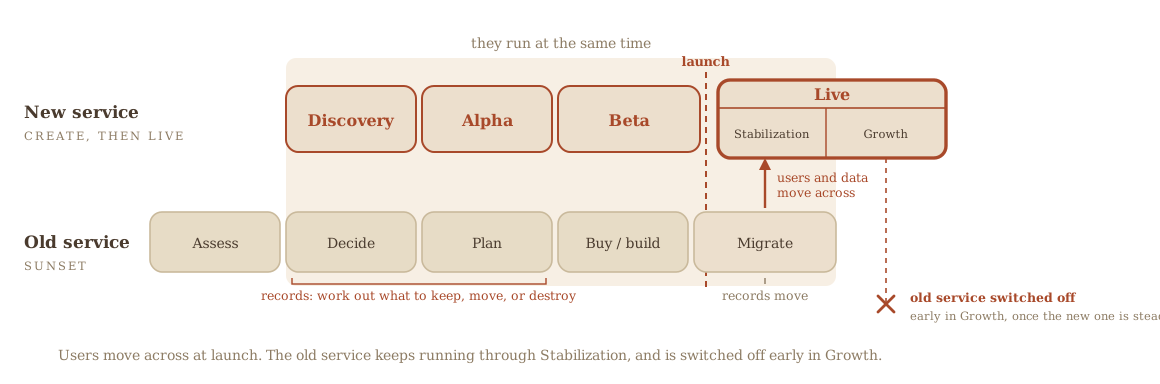
These steps are shown in order, but in practice they overlap and some repeat. While you acquire and migrate to the new solution, you are still shutting down the old one, so steps four and five run together. You are out of Sunset when the old service is fully shut down and its data and users have a safe home. If you replaced it, that new service has already begun its own Create.
Where to go next
Options analysis
The full version of the "assess options" step, shared with Create.
— open practice pageCheckpoints a GC digital service has to pass
The map of official checkpoints across Create, Live, and Sunset, including the records checkpoint at exit.
— open practice pageProcurement thread
How the buying works if you are acquiring a replacement.
— open practice page
CAUTION
The cost of leaving it late
Sunset goes much more smoothly when it starts early. The most common difficulties all come from leaving it late:
Procurement runs out of time.
Buying a cloud solution can take 12 to 24 months. Start late and you may not have a replacement before support ends.
The help is already taken.
Skilled implementation partners get booked by the teams who started earlier.
Rushed migrations cost more.
Compressed timelines mean more defects, less testing, and weaker adoption.
Security exposure.
Running on an unsupported platform past its end date leaves you without security patches.
Operational disruption.
Miss the deadline and the business processes that depend on the service can stop.
The official instruments in Sunset
Everything official that has something happening to it during Sunset, and what that something is. The tag says what stage the instrument reaches here, not that it is finished.
Placing an instrument in a sub-phase is this guide's own editorial choice, anchored where possible on a real deadline in the instrument itself. The full detail, including who does the work and what the business owner personally does, is in the full instruments table.
- Submit
- Sent, filed, registered or published where the rule says.
- Keep current
- The service changed, or the clock came round. Re-run it, re-test it, or refresh the record.
- Close out
- Formally ended, disposed of, or marked retired.
What the tags mean
Every service
- Security assessment and authorization, ending in the Authority to Operate (SA&A, ATO)AuthorizationClose outsource
The formal permission for the service to run in production.
The authorization is formally ended and decommissioned storage securely wiped, rather than the system being switched off and forgotten.
The government-wide register of what services exist, who they serve, how digital they are, and how much volume they handle.
Updated to show the service retired.
- Application Portfolio Management (APM)RegisterClose out
The register of the applications behind the services, rated for business value, technical condition, support cost and criticality, and sorted into tolerate, innovate, mitigate or eliminate.
Marked retired.
The written consent from Library and Archives Canada without which no government record may be destroyed.
Confirm the authority is in place and that no litigation hold, access request or other statutory duty blocks destruction. Records with archival value transfer to Library and Archives Canada.
A set of things any system holding government information has to be able to do: apply retention and disposition rules in a way that can be audited, carry metadata, support the department's classification structures, work with other systems, and export in bulk in open formats.
Bulk export in open formats is what makes a migration possible when the service is replaced.
Only if it applies
A short form that states, for one contract, exactly what security the supplier and its people need: what level of information they will touch, what screening each role needs, and whether the company may hold government information at its own offices.
The decommissioning or migration contract is itself a new requirement, so a vendor doing the retirement work needs one too.
Applies when Only where the supplier or its people will access Protected or Classified information or assets, enter restricted sites, or connect electronically to departmental systems, which includes any access to personal information the department holds. Where there are no security requirements, no check list is produced and the department certifies that instead.
The rules for anything the public sees: the domain, the global header and footer, the Government of Canada signature and wordmark, the mandatory page templates, the information architecture, and the content style guide.
Pages are retired through the web team; a downloadable app is removed centrally rather than by the department.
Applies when Every external-facing website and web application. Inside the department the head of communications is accountable for external-facing websites and for mobile applications, and the directive holds both to its Appendix D, the Standard on External-facing Websites and Mobile Applications. The same directive requires the official web analytics tool administered by Service Canada.
- Responsive web, or a native mobile appStanding dutySubmit
The rule that a public-facing service works properly on a phone, and that choosing a downloadable app over a responsive web page has to be justified.
App removal is performed centrally, which is a dependency at retirement as well as at launch.
Applies when Every public-facing website and web application.
Assumptions this page makes
You are already working to the Government of Canada Digital Standards, design with users, iterate and improve frequently, work in the open, use open standards, address security and privacy, build in accessibility, empower staff, be good data stewards, design ethical services, and collaborate widely, and to the law on privacy, security, official languages, and accessibility. The standards say how the government works in the digital world. The six Government of Canada digital competencies say what every public servant has to be able to do to work that way, and the team page covers them. This guide builds on those.