Security
Security runs through the whole life of a service, from the first design sketch to the day it is turned off. A service that was safe at launch drifts out of date as the threats around it change and its software ages, so security is work that never quite stops. The same five questions come round again and again: what is at risk, how do we defend it, how do we spot trouble, how do we contain it, and how do we recover. Those five make up the security lifecycle.
Summary
Security keeps coming round. The five functions repeat for as long as the service runs. A service that was secure the day it launched, and has not been looked at since, has quietly stopped being one.
What goes wrong is usually something ordinary. An unpatched component, a default password, a permission left wider than it needed to be. The dramatic attacks are the ones that make the news, but these are where most of the harm comes from.
Guard the few things that would do real harm. Protecting everything to the same high standard costs more than most departments can afford, and it tends to end in protection spread too thin to help anywhere. Work out which parts would cause real harm if they failed, and protect those properly.
It is far cheaper in the design than in production. A weakness caught while somebody is still drawing the service costs a fraction of what the same weakness costs once people are using it. If a supplier is building it, that is the argument for putting the security work in the contract.
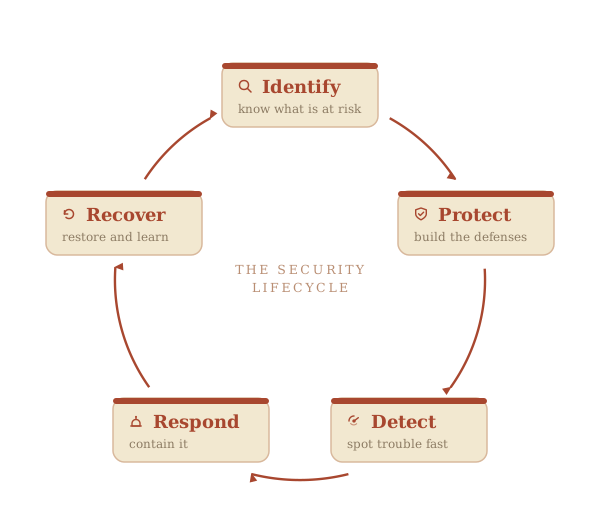
These are the five functions of the recognizable security lifecycle, the model the Government of Canada works in: Canada's ITSG-33 sets out the GC IT-security risk-management lifecycle, the Canadian Centre for Cyber Security publishes the guidance under it, and the same five functions are the international frame of the NIST Cybersecurity Framework.
What good looks like
Security is planned and funded from the start, with the risks worked out before any code is written.
Access follows least privilege, meaning each person and system gets only the access they need, and that access is audited.
Patches are applied on a schedule and the application is tested for vulnerabilities on a regular basis.
Monitoring and alerting flag unusual activity, because you cannot prevent everything and what counts is how fast you notice.
An incident response plan exists and has been rehearsed, so a problem is contained quickly rather than weeks later.
The service can be brought back after an incident, and the lesson is fed back into the design.
The service's security maturity level is known, with a clear next step to improve it.
Third-party components, the open-source and bought libraries the service is built on, are inventoried and watched for known problems.
Why it matters
When security fails, a service can go offline or leak people's personal information, and public trust is slow to rebuild. The causes are usually mundane: an unpatched component, a default password, a permission left too wide.
Each of the five functions guards against a different failure, and the cycle only holds if none of them is skipped. Catching a flaw early also costs less, because one designed in and found late is the most expensive kind to undo.
The Government of Canada's how-to for all of this is the Guideline on Secure Application Development, which covers building security into each stage of development, secure coding, handling third-party components, and managing vulnerabilities.
Whose job it is
Security is shared across the team, with each role holding a different part:
- Developers write secure code and fix what the scans find.
- Security specialists decide which threats to defend against and review the design.
- Operations run and monitor the service once it is live.
- The business owner of the application makes sure security is planned and paid for from the start, approves the plan for handling threats, accepts the risk that remains after the fixes, and gives the deploy go-ahead (the formal approval that lets a service go live).
A closer look
- 1Identify
- 2Protect
- 3Detect
- 4Respond
- 5Recover
Comparison
Two ways to do security
Pax
Meet Pax, a service manager. They built security into the grant portal from the design:
- built a threat model to set out what could go wrong, and chose secure defaults
- gave each person and system only the access they needed, and audited it
- patched on a schedule and watched the third-party components for known problems
- kept a rehearsed incident response plan
The result: when a phishing attempt came, it was caught and contained quickly, and the data stayed safe.
What Security looks like in each phase
The five functions are present throughout, but their weight shifts across the life of a service.
This is where Identify and Protect are designed in, before any code is written. The team builds a threat model to set out what could go wrong and who might attack the service (the threat model itself lives in the Identify block of "A closer look").
The team then chooses secure defaults so the safe option is the default one, and sets how the service will handle identity and access. Security requirements are written into the contract so the supplier is held to them. A weakness fixed at the design stage costs far less than one found in production.
The official instruments behind security
Everything official this subject brings with it, and where in a service's life each one comes up. The full detail, including who does the work and what the business owner personally does, is in the table on the home page.
A rating of how much injury would follow a leak, an unwanted change to the information, or an outage. It is set on four levels, from low to very high, and the result decides how large a set of security controls the build has to meet.
- DiscoveryGather
- AlphaFill
- GrowthKeep current
- MaturityKeep current
The exercise that lists what could go wrong, ranks each one by how likely it is and how much damage it would do, and states the risk left over once the safeguards are in place. It covers deliberate, accidental and natural threats alike, so it is wider than a cybersecurity exercise.
- AlphaGatherFill
- BetaFill
- GrowthKeep current
- MaturityKeep current
- Physical security assessment and Authority to Occupy Facility (ATOF)Only ifAuthorization
The second security track, running in parallel and covering buildings, equipment and physical space. It uses the same harmonized method as the systems assessment, run by different people and ending in a different signature.
- AlphaCheck
- BetaFillSign or accept
- Security assessment and authorization, ending in the Authority to Operate (SA&A, ATO)Every servicesourceAuthorization
The formal permission for the service to run in production. Someone with the authority reads what the security work found, accepts the risk that is left, and signs. For a departmental system that signer is normally the business owner.
- DiscoveryGatherSign or accept
- AlphaSign or accept
- BetaSign or accept
- GrowthKeep currentSign or accept
- MaturityKeep current
- SunsetClose out
- Business impact analysis (BIA)Every serviceAssessment
The exercise that decides how critical the service is, and produces four numbers with it: maximum allowable downtime, minimum service level, recovery time objective and recovery point objective.
- AlphaGather
- BetaGather
- StabilizationKeep current
- GrowthKeep current
- MaturityKeep current
- Business continuity plan (BCP)Only ifPlan
The written arrangements for keeping a critical service delivering at a minimum acceptable level during a disruption, and recovering it afterwards. There is one plan for the department, and this service either has its own section in that plan or is covered by several.
- BetaGather
- StabilizationKeep current
- MaturityKeep current
The service team's own recovery arrangements: how this system gets back up, in what order its parts are restored, and proof from testing that the restore works. The departmental business continuity plan belongs to the department; this is the part the team owns.
- BetaFill
- StabilizationKeep current
- MaturityKeep current
The duty to have a way of spotting, containing and reporting a cyber incident before one happens, and to report it up the government-wide chain when it does. The government-wide plan sets who is told, in what order, and how an event escalates into a coordinated response.
- BetaFill
- StabilizationKeep current
- GrowthKeep current
- MaturityKeep current
- Material privacy breach reportOnly ifFiling
The report a department must make when personal information is lost, accessed or disclosed in a way that could reasonably be expected to cause serious injury. It goes to the Office of the Privacy Commissioner of Canada and to the Treasury Board of Canada Secretariat, and the people affected are notified.
- BetaCheck
- StabilizationSubmit
- GrowthKeep current
A short form that states, for one contract, exactly what security the supplier and its people need: what level of information they will touch, what screening each role needs, and whether the company may hold government information at its own offices.
- DiscoveryCheck
- AlphaFill
- BetaSign or acceptSubmit
- GrowthKeep current
- MaturityKeep current
- SunsetKeep current
The clearances a company and its individual staff must hold before touching sensitive government work. A department cannot issue them itself, and the work cannot be awarded until the clearance is confirmed in writing.
- AlphaCheck
- BetaGatherSign or accept
- GrowthKeep current
- MaturityKeep current
The extra security work a cloud-hosted service carries: a ready-made control profile to build against, guardrails that have to be implemented, validated and reported within the first 30 business days of getting a cloud account, and a security assessment that accounts for the split between what the provider does and what the department does.
- AlphaCheckGather
- BetaFillSign or accept
- GrowthKeep current
- MaturityKeep current
Two ratings, from one to four, of how sure the service has to be about who someone is and how strong the sign-in has to be. They constrain the design from the beginning, because they decide what the sign-in has to do before anyone builds it.
- DiscoveryCheck
- AlphaGatherFill
- GrowthKeep current
Further reading
Security in the Government of Canada comes under the Policy on Government Security, and under its Directive on Security Management, which requires security to be managed across a system's whole life. The department gathers all of it into a departmental security plan, a three-year plan reviewed every year and approved by the deputy head, and a service's security posture, its residual risks and its continuity requirements all roll up into that plan.
The closest companion to this page is the Guideline on Secure Application Development, on the GC network, which this thread leans on throughout. It also draws on ITSG-33 for the GC control catalogue, and on the open OWASP Top 10 and the NIST Secure Software Development Framework, translated into a business owner's decisions.
To work out where spending buys down the most risk, the Cyber Centre's top 10 IT security actions ranks the defences that matter most, and its baseline controls for small and medium organizations is a plainer starting point for a smaller service. For the case that security is cheapest when designed in rather than bolted on afterwards, the US Cyber Defense Agency's secure-by-design principles make the argument in a business owner's terms.
See also
Assumptions this page makes
You are already working to the Government of Canada Digital Standards, design with users, iterate and improve frequently, work in the open, use open standards, address security and privacy, build in accessibility, empower staff, be good data stewards, design ethical services, and collaborate widely, and to the law on privacy, security, official languages, and accessibility. The standards say how the government works in the digital world. The six Government of Canada digital competencies say what every public servant has to be able to do to work that way, and the team page covers them. This guide builds on those.