Options analysis
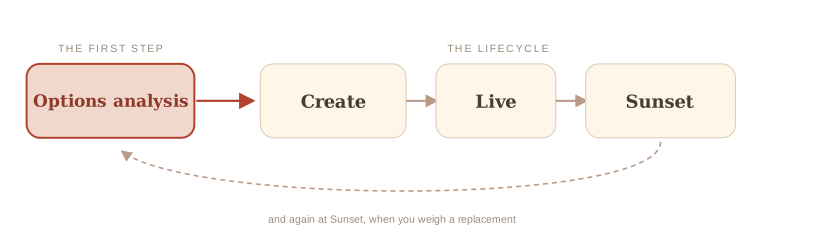
Options analysis is the step where you work out the different ways a need could be met, and weigh them, before committing to any one. It happens early, before anything has been bought or built, and it applies whether you are solving a new problem or replacing a service that is ending.
Why do it? Because the instinct is to jump straight to a solution, usually the one already in mind, and that is how departments end up buying something they did not need, or a worse answer than they could have had. The value of this step is the pause: name the problem plainly, then look across the real options with clear eyes before you pick one. An afternoon here can save a two-year procurement.
Start with the problem
Before you compare options, be sure what you are solving. Name the problem and the outcomes you need, and separate the business need from the features of whatever you have now. A clear need is what every option gets measured against, and it keeps you from rebuilding an old tool's quirks into a new one.
TBS's GCcase migration guidance puts it the same way: distinguish business needs from system features, so you do not recreate a legacy solution by default.
The field of options
The answer might not be a purchase at all. Sometimes a small process change, or a tool another team already runs, solves the problem without buying anything. Here are the options, roughly cheapest first:
How to weigh them
No option is best in the abstract. The right one depends on your situation. A few things to weigh for each:
- How soon you need it and how long each path takes to stand up.
- Whether it needs procurement and how long that runs. For a cloud solution this can be 12 to 24 months from start to contract award, depending on value and complexity.
- How complex your service is and whether the option fits that complexity.
- Integrations and dependencies which are easy to underestimate and often decide the effort.
- How much you would need to customise and whether that is worth it.
- Cost over its whole life not just to set up.
- Who supports and maintains it once it is running.
- Room to grow and how well it meets where you are heading.
TBS's GCcase migration guidance includes a structured checklist that compares the main options against criteria like these. It is the deeper tool when you are ready to score them.
Do the homework first
You are almost never the first to face this. Before you commit, look at how other departments solved the same problem and what it cost them. A good place to start is the Government of Canada's own shelf. The GC Reference Architectures repository holds approved starting designs for common kinds of system, including case management and grants and contributions, so a team builds from a proven pattern instead of a blank page. A draft enterprise solutions catalog lists what other teams already run. Both are on the Government of Canada network.
Other governments have already solved versions of this, and many publish how, so you can lift a worked approach instead of working it out from scratch. Australia's reuse standard and the UK's Technology Code of Practice turn 'check for reuse before you spend' into a concrete checklist you can follow, and the UK's guidance on sharing and reusing technology shows the shared platforms and components their teams reuse. Borrowing a worked answer beats starting from a blank page.
What Options analysis looks like in each phase
Create.
In Create, this is your "look before you buy" step, done before any contract exists.
Sunset.
In Sunset, this is how you assess options for a replacement, or reach the decision to retire without one.
Why this matters
PSPC's procurement guidance begins after the decision to buy is made. This step is on you, and it decides where the biggest savings and the biggest regrets land.
Assumptions this page makes
You are already working to the Government of Canada Digital Standards, design with users, iterate and improve frequently, work in the open, use open standards, address security and privacy, build in accessibility, empower staff, be good data stewards, design ethical services, and collaborate widely, and to the law on privacy, security, official languages, and accessibility. The standards say how the government works in the digital world. The six Government of Canada digital competencies say what every public servant has to be able to do to work that way, and the team page covers them. This guide builds on those.